A desktop edition with a dedicated audio path
VinylRest Live Linux runs on the x86_64 Linux host and owns the ALSA capture and playback session. A browser provides the controls and monitoring; it does not carry the restored audio. The selected input and output can share a duplex interface or use separate devices when they expose a common native sample rate.
Turntable and phono stage
ALSA input
Live restoration
ALSA output
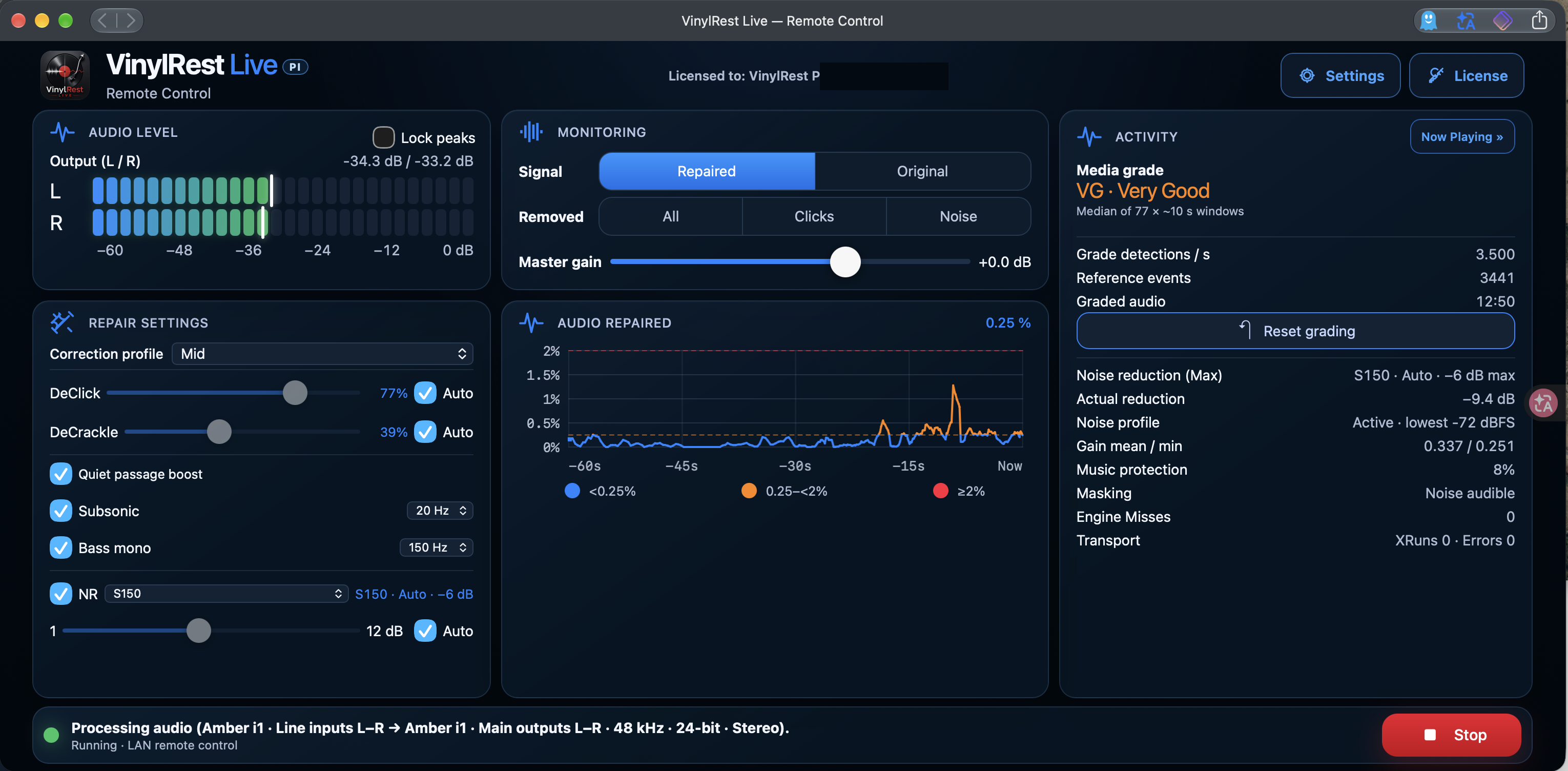
The listening path runs DeClick, DeCrackle and optional NRNG noise reduction. A separate reference analysis drives media grading and automatic decisions without replacing the audio heard through the output.
Download: use the direct x86_64 AppImage link below, then follow Getting started. This build targets Ubuntu 24.04 with glibc 2.39 or later.
Download VinylRest Live Linux x64
Choose a chapter
Getting startedCheck the compatibility target, prepare the AppImage, open the browser interface and start the first licensed session.
Audio setupSelect ALSA inputs, outputs and stereo pairs, use a common native rate, and calibrate level and surface noise.
RestorationUse NG2 DeClick and DeCrackle, NRNG S150/S200, automatic controls and the independent media grade.
Browser controlOpen the local WebApp from the host or trusted LAN and understand its HTTP security boundary.
LicensingRequest or activate a license before audio opens, then reactivate or deactivate this installation safely.
TroubleshootingDiagnose launch, FUSE, browser, ALSA route and audio-session problems without changing host configuration blindly.
Tested hardwareSee the MagicNUC AS1 Plus and ESI Amber i1 setup we use as our practical minimum.
Recommended first session
- Confirm that the x86_64 host is inside the documented Ubuntu 24.04 / glibc compatibility target and that its ALSA devices are already available to your desktop user.
- Download the final stable x86_64 AppImage, make it executable, launch it without arguments, and let Live open
http://127.0.0.1:8001/. - Request, recover or activate a license in the License interface. Audio remains closed until a usable license is present.
- In Settings → Audio, select the stereo input and output and their connector pairs. Use a rate supported by both endpoints.
- Lower the downstream listening volume, select Start, and confirm that the output meters move without clipping.
- Compare Repaired with Original before increasing repair or noise-reduction settings.
Choose the route first: device selection and a common native format matter more than aggressive repair settings. If the route changes, repeat the relevant calibration checks and confirm that XRuns and transport errors remain at zero.
Supported compatibility boundary
- Product
- VinylRest Live Linux x64, distributed as an AppImage. No system-wide package installation or automatic desktop-menu integration is implied.
- Target
- Ubuntu 24.04 x86_64 with glibc 2.39 or later. Other distributions require their own qualification even when their glibc version is sufficient.
- Practical minimum
- We consider a MagicNUC AS1 Plus with an ESI Amber i1 the practical minimum for normal Live use. See our tested hardware.
- Audio
- Stereo ALSA input and output, with the host providing
libasound.so.2and its matching configuration and plugins. - State
- Per-user XDG directories for settings, license data and the desktop lock. These paths survive replacement of the AppImage.
- Browser
- Optional
xdg-openorgioopens the local interface. The WebApp remains reachable manually when no opener is installed.
Conventions used in this manual
- Bold names such as Start and Original reproduce labels in the Live interface.
- Settings → Audio identifies a section in the WebApp.
- Latency values are software estimates; ALSA, interfaces and downstream hardware add their own delay.
- The media grade is an experimental audio measurement, not a visual or marketplace grading service.