Build the signal chain
A turntable requires a suitable phono preamplifier unless it already supplies line level. Connect the phono stage to a stereo line input and connect the selected output to an amplifier, powered speakers or a DAC and downstream system. VinylRest Live does not apply RIAA equalization and does not replace the phono stage.
Select input and output independently
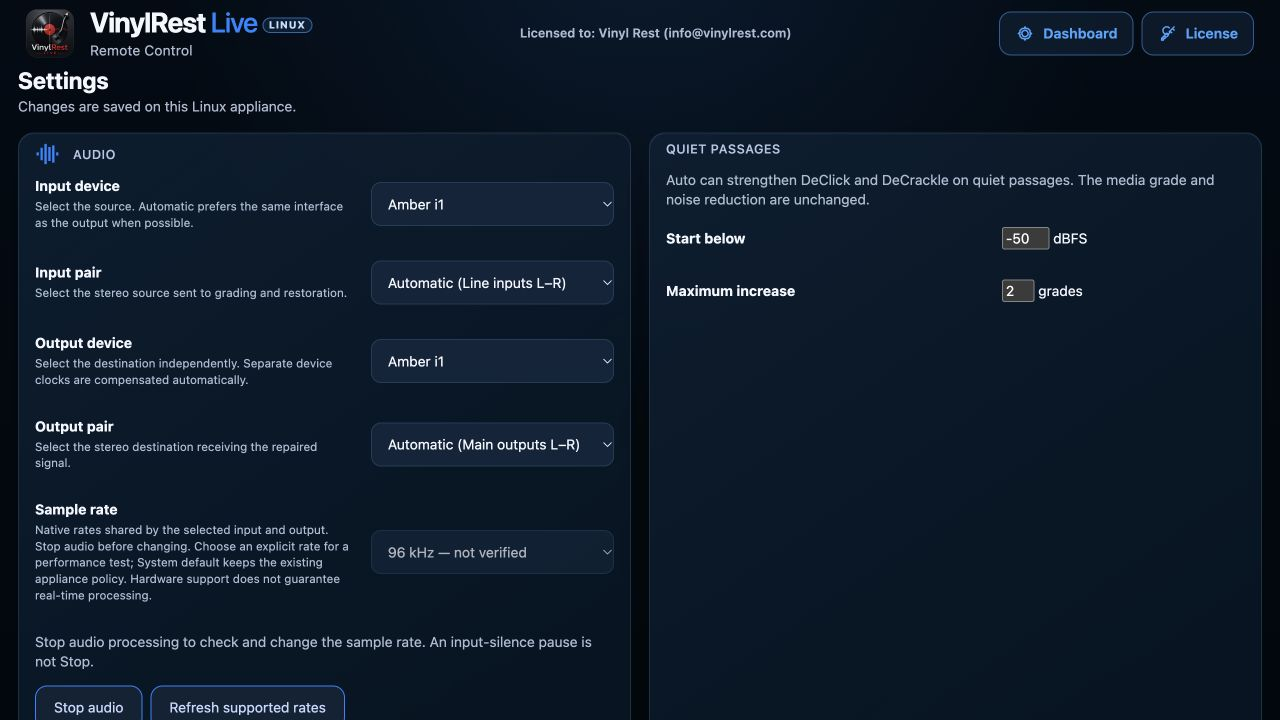
Open Settings → Audio. Live can use a duplex interface as the simplest route or select capture-only and playback-only endpoints independently. Choose one adjacent stereo pair in each direction. Multichannel devices remain usable through numbered pairs such as Inputs 9–10 or Outputs 3–4, with driver connector labels where available.
Automatic selection prefers a suitable duplex interface. With one endpoint selected explicitly, Live can prefer the same card for the other direction or resolve that direction separately. A selected device that is absent is reported as unavailable rather than silently replaced.
Use a common native rate and depth
The AppImage launcher requests a 96 kHz ceiling with automatic PCM depth. Live probes the underlying endpoints and chooses their highest common production rate at or below that ceiling. The selected rate and endpoint depths appear in the dashboard and startup diagnostics.
Both devices must support a common nominal sample rate. Automatic depth can select 24-bit capture with a 16-bit output, or accept a 16-bit-only input, without forcing a plugin conversion to hide a rate mismatch. Do not assume that an arbitrary 44.1-to-48 kHz conversion is part of the application path.
- Accepted processing rates
- 44.1, 48, 88.2, 96, 128, 176.4 and 192 kHz in 16-bit or packed 24-bit stereo.
- Auto and grading
- Auto calibration and media grading are calibrated for all of these rates except 128 kHz. Audio can run at that transport rate, but grading remains uncalibrated instead of borrowing another rate's thresholds.
- Qualification
- The presence of a format in the application does not qualify every driver, interface, buffer or full DSP load at that format.
Separate devices and clock drift
When input and output use different physical clocks, Live uses the output hardware as the playback reference. It estimates the hardware-rate relationship from ALSA status timestamps, application frame positions and capture-ring fill, then applies prepared final-playback drift correction. The correction is shared by the aligned monitoring paths; it does not alter grading or automatic-decision input.
The same audio card bypasses the correction path. Unsupported timestamps are treated as unavailable rather than fabricated. USB quantization, a suspended interface or an XRun can still make a different-hardware route unsuitable, so observe XRuns and Errors after any change.
Calibrate level, silence and surface noise
Settings → Calibration provides guided raw-input measurements. Start the relevant capture explicitly, leave it running long enough for a useful reading, then stop it before deciding whether to apply a suggested setting.
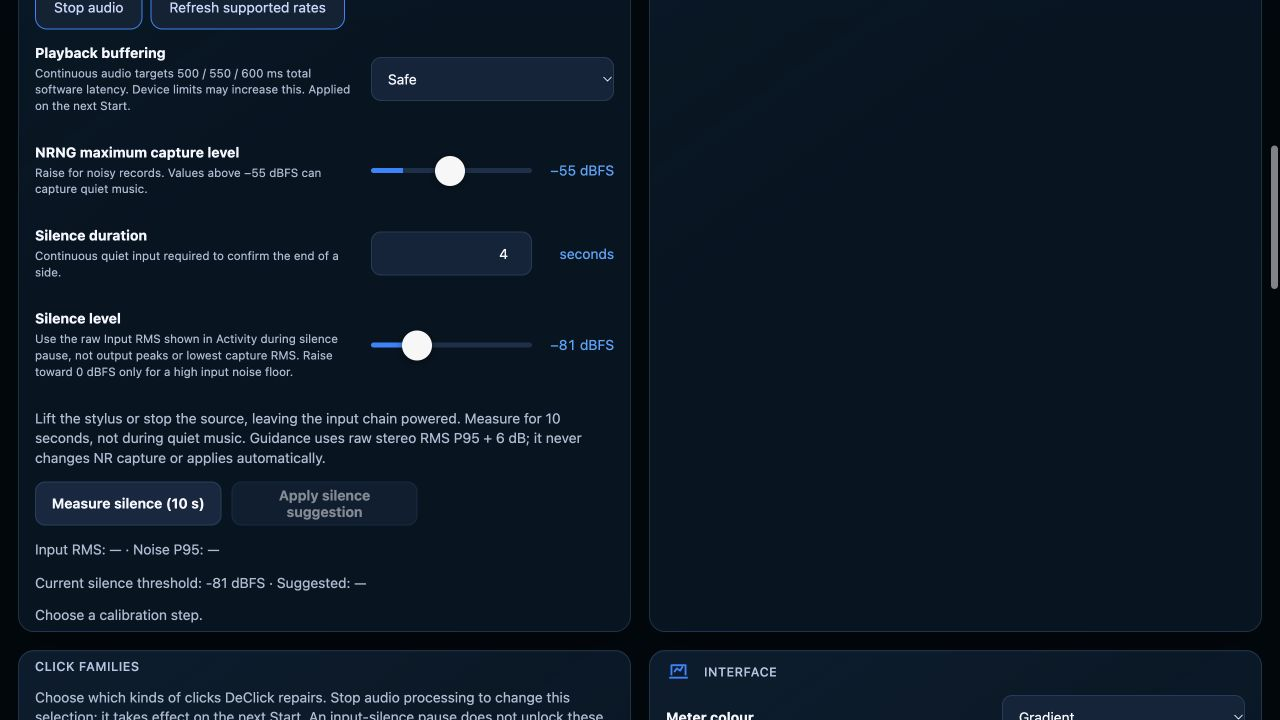
- Balance and level: play a representative record passage and confirm that both channels reach Live with useful headroom and no obvious channel imbalance.
- System silence: stop playback or mute the turntable path, then measure the electrical silence of the complete input chain.
- Surface noise: capture a lead-in or quiet groove with record surface noise but no music, so the suggested noise threshold reflects the actual record and stylus.
- Review any suggested silence threshold or NRNG noise-capture level, then apply it only when it suits the measured setup.
Calibration capture is excluded from grading, automatic correction observation, NRNG profile acquisition and track recognition while active. Changing an endpoint or stereo pair invalidates route-specific calibration; repeat the relevant measurements after the route changes.
Verify before listening for a full side
- Both channels move, with no persistent one-channel silence or reversed routing.
- The dashboard reports the expected capture rate and depth.
- Output peaks remain below 0 dB while listening at a safe level.
- XRuns, transport errors and engine misses remain at zero during representative playback.
- Repaired and Original remain aligned when you switch monitoring mode.