
The listening path and the reference path
Live accepts original stereo PCM, applies its restoration and conditioning controls, then sends the result to the selected playback endpoint. A separate reference analysis observes original PCM at fixed settings. It drives Auto decisions and the experimental media grade without changing the output directly.
NG2 DeClick and DeCrackle
VinylRest Live uses the fixed NG2 chain with separate DeClick and DeCrackle stages. A manual sensitivity of zero preserves a transparent bypass for that stage. Higher sensitivity can find smaller defects but may also affect musical transients.
For a fresh setup, begin with the Mid correction profile and let DeClick and DeCrackle run in Auto. The two Auto controls make independent decisions within the selected profile. Turning Auto off restores the saved manual value.
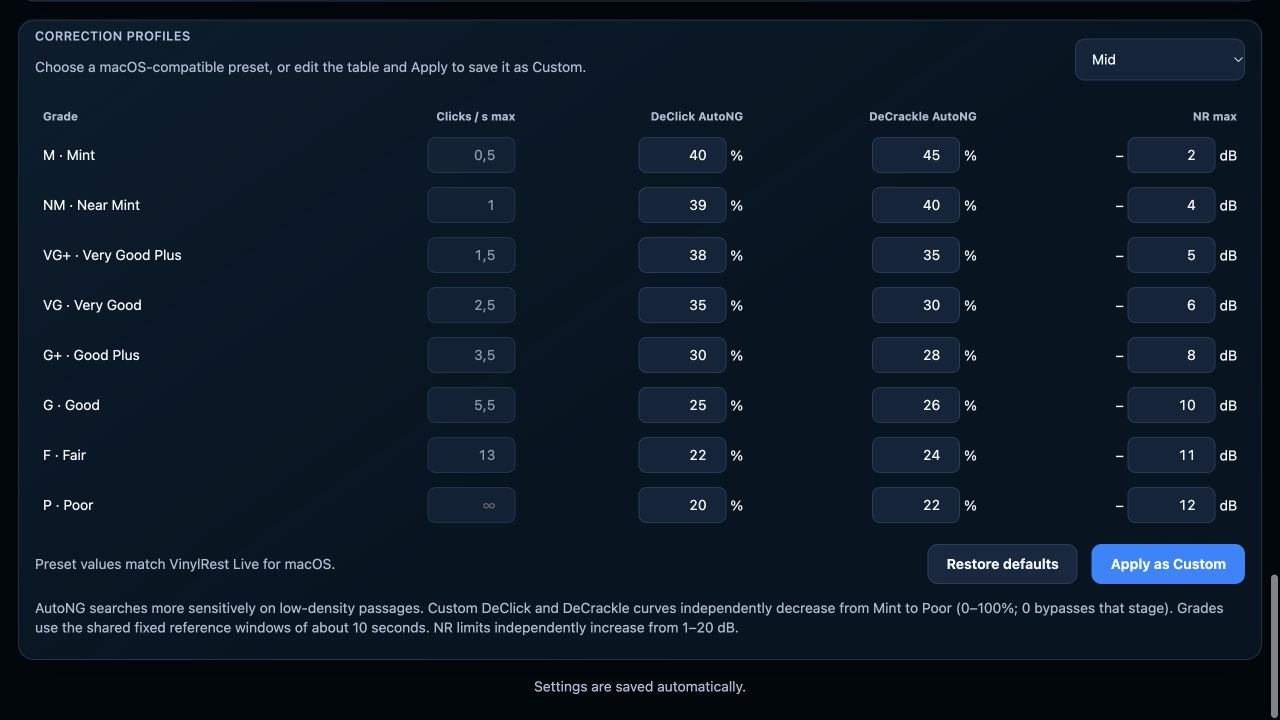
- Profiles
- Paranoid, Light, Mid, High and a validated Custom AutoNG configuration.
- Quiet-passage boost
- Optional automatic adaptation can become more active in very quiet passages without changing the displayed media grade or NR limit.
- High rates
- At 88.2 kHz and above, Auto DeClick is limited to the ordinary click family on all machines. DeCrackle and noise reduction remain available.
NRNG surface-noise reduction
NRNG follows the DeClick and DeCrackle stages. Choose S150 for the conservative profile or S200 for stronger reduction. The maximum reduction remains bounded at 12 dB.
NR can run manually or with Auto. Auto follows the independent grade and applies a grade-dependent ceiling; it does not promise uniform attenuation at every frequency. A prepared aligned branch stays available when NR is bypassed, so comparison changes do not introduce the same timing discontinuity as rebuilding the noise stage.
Acquire a useful noise profile
Use a lead-in or a quiet groove with surface noise but no music. Live observes a four-second context, ignores an initial segment, and chooses a qualifying one-second candidate. Adjust the maximum admissible capture level only after measuring the actual record surface noise in Audio setup.
A Generic fallback may be available while a local profile is acquired. Relearn noise starts a new acquisition without rebuilding the transport. If no usable renderer is prepared, the branch remains an aligned bypass; check the displayed profile state before assuming that a newly requested profile is already active.
Vinyl conditioning and tone
The Linux listening path can apply Subsonic, Bass mono, Warmth and Air. Keep tone controls neutral while establishing the repair baseline, then make small changes according to the room and playback system.
Compare aligned monitor paths
Use Repaired for the conditioned listening result and Original for the aligned unfiltered record path. Diagnostic monitor choices can isolate the overall removed material or distinguish click and noise removal. Switching monitor paths does not change grading, recognition or the source used for the next automatic observation.
Understand the media grade
The session grade is the median of completed, non-overlapping approximately ten-second reference windows. It is calculated from original PCM and calibrated for the negotiated session rate. Calibration, silence and incomplete windows can be excluded from the cumulative measurement.
- Auto calibration and grading are defined for 44.1, 48, 88.2, 96, 176.4 and 192 kHz.
- 128 kHz transport is supported, but the grade remains uncalibrated.
- Reset grading starts a fresh measurement without stopping audio.
- Sustained inter-side silence can reset the grading and recognition lifecycle for the next side; fresh noise-profile acquisition is separate.
Optional track recognition
The AppImage launcher enables optional track recognition. When it has a usable network connection, recognized artist and title information can accompany the browser display. Recognition does not feed restoration, grading, Auto or the audio timeline.