What VinylRest File does
VinylRest File is a native macOS application for restoring existing digital transfers of records. It repairs clicks and pops, treats fine crackle independently, then can reduce continuous surface noise. It does not record a turntable signal and never edits the selected source file in place.
Source audio file
DeClick
DeCrackle → NRNG S150/S200
New restored copy and reports
Non-destructive by design: the source remains untouched. A normal successful job publishes a restored audio file plus an analysis report and a repaired report beside the selected destination.
Choose a chapter
Getting startedInstall the application, choose a supported file and complete a conservative first restoration.
Interface and controlsLearn the input selector, restoration card, progress area, synchronized comparison player and result summary.
Restoration and gradingUnderstand the fixed NG2 path, Automatic and Manual modes, NRNG S150/S200, local decisions and the M–P grade.
Folder processingReview the non-recursive queue, set safe concurrency, confirm replacements and follow each file.
Profiles and settingsChoose Paranoid, Light, Mid or High, create a validated Custom table and tune folder concurrency.
License and updatesRequest and activate the free Beta license, recover or deactivate it, and install signed application updates.
Outputs and command lineIdentify restored audio and JSON reports, reuse analysis timelines, compare Source, Clicks and Output, and use the terminal workflow.
TroubleshootingResolve unsupported files, existing outputs, unavailable noise reduction, cancelled jobs and playback issues.
Recommended first restoration
- Select Single File, then choose a supported digitized record side.
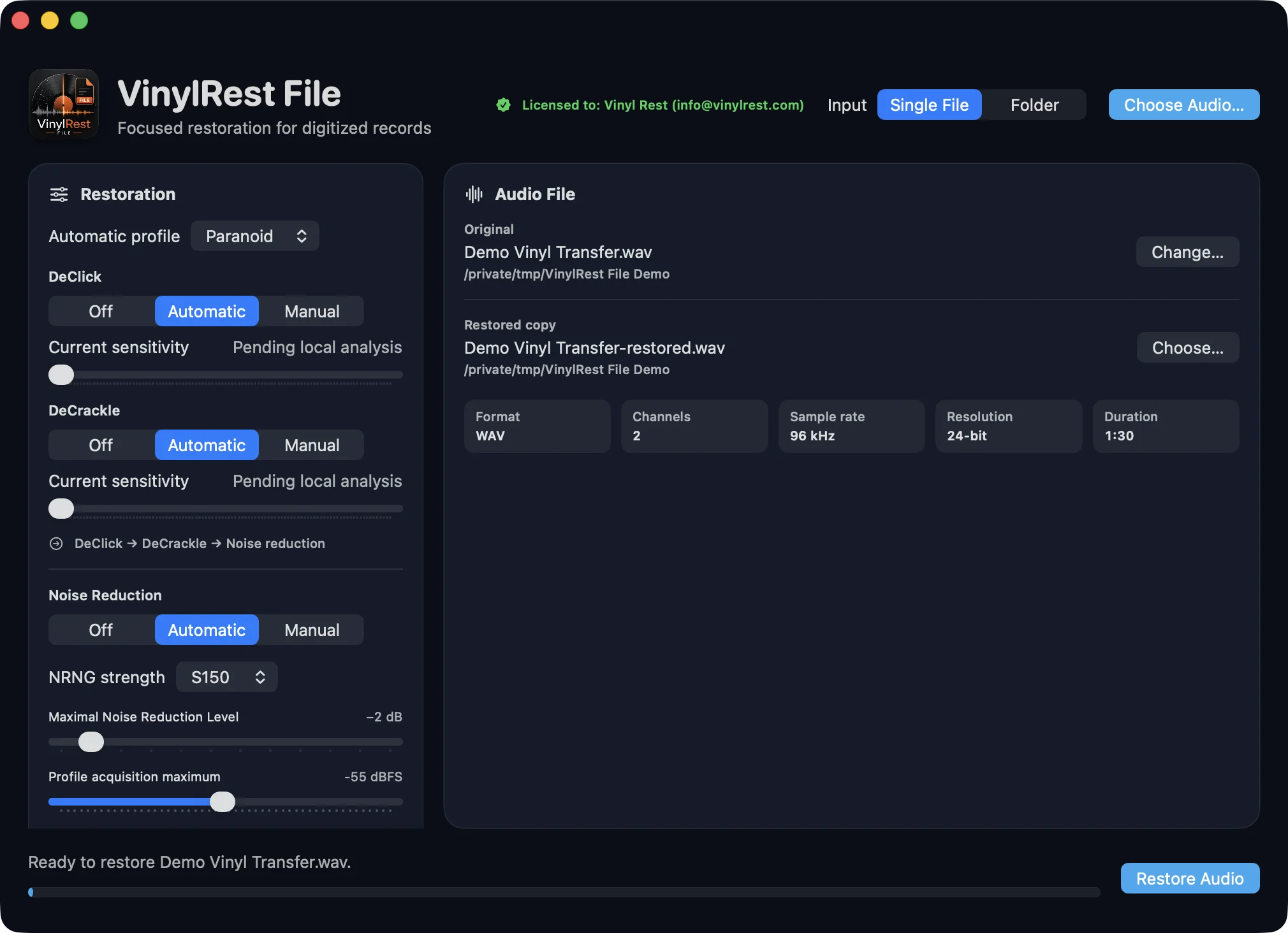
- Leave Paranoid, Automatic DeClick, Automatic DeCrackle and NRNG Conservative S150 selected.
- Check the proposed restored-copy name. Use Choose… only if you want another folder or filename.
- Select Restore Audio and let the complete analysis and restoration finish.
- Review the grade and repair summary, then use the synchronized player to compare Source, Clicks and Output at the same listening level.
One current engine: File 1.00b1 uses the fixed NG2 sequential DeClick → DeCrackle reconstruction path. The earlier Basic and Extended method selector is no longer part of the application.
Start conservatively: Paranoid applies the smallest factory limits for every measured condition. Change one control at a time and judge the result on exposed vocals, cymbals, piano attacks and quiet passages.
Requirements and supported material
- Mac
- macOS 15.4 or later. The distributed Universal 2 application runs natively on Apple silicon and Intel Macs.
- Containers
- WAV, AIFF/AIF, FLAC and lossless ALAC in an
.m4acontainer. AAC inside.m4ais not accepted. - Channels
- Mono or stereo. Files with more than two channels are rejected before processing.
- Resolution
- WAV and AIFF: 16-, 24- or 32-bit PCM. FLAC and ALAC: 16- or 24-bit.
- Sample rate
- Standard production rates through 192 kHz. Noise reduction is available at 32, 44.1, 48, 64, 88.2, 96, 128, 176.4 and 192 kHz.
- Storage
- Enough free space for a new restored file, reports and temporary decoding. Folder processing and compressed formats can require several simultaneous temporary files.
Conventions used in this manual
- Bold names such as Restore Audio reproduce labels in the application.
- Paths such as Settings → Automatic Profiles identify a window and tab.
- The media grade is an audio-derived condition measurement. It is not a visual inspection or marketplace guarantee.
- “Automatic” means local DeClick and DeCrackle decisions are recalculated from the source. The global grade selects only the fixed whole-file NRNG ceiling.