What a profile controls
One profile is always selected. It contains eight grade rows from M through P and four values per row:
- Events / s max
- The inclusive upper reference-event rate for that global or local grade. P has no upper boundary.
- DeClick max
- The locally interpolated Automatic DeClick limit.
- DeCrackle max
- An independently calibrated Automatic DeCrackle limit.
- NR max
- The whole-file NRNG ceiling selected from the resolved global grade. The applied value is capped at 12 dB and the engine may use less below it.
The same immutable profile snapshot classifies the global report and drives local Automatic interpolation. The global grade does not cap local DeClick or DeCrackle; it selects only the fixed whole-file NRNG maximum.
Factory profiles
| Profile | Role |
|---|---|
| Paranoid | Product default and most conservative factory correction limits |
| Light | A light restoration curve for restrained intervention |
| Mid | A moderate curve for material that needs more repair |
| High | The strongest factory curve; compare musical transients carefully |
| Custom | Your last fully validated table, available after it has been applied |
Automatic Profiles tab
Open Settings… with ⌘,. The first tab shows the active profile and its complete table.
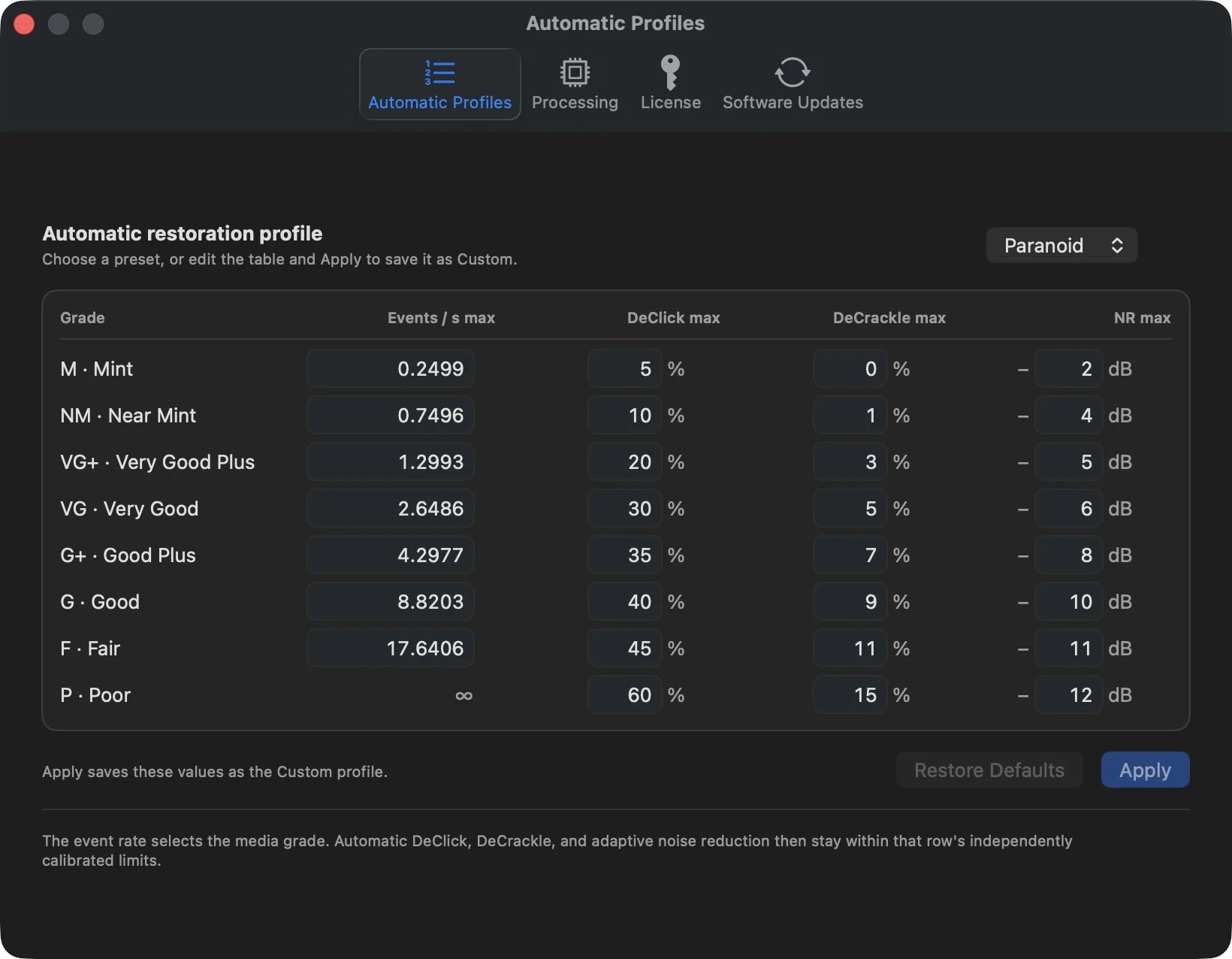
Create or update Custom
- Choose a factory profile as a useful starting table.
- Edit one or more event boundaries or stage limits.
- Read the validation message below the table. Apply remains unavailable until the entire table is valid.
- Select Apply. VinylRest stores the complete table atomically and selects Custom.
- Run a short listening comparison before applying the table to a large folder.
A valid table must satisfy all of these rules:
- all eight grade rows are present in M, NM, VG+, VG, G+, G, F, P order;
- finite event boundaries are positive and strictly increasing; P remains unbounded;
- DeClick limits are 0–90% and never decrease toward poorer grades;
- DeCrackle limits are 0–90%, never decrease and never exceed DeClick in the same row;
- NR limits are 1–20 dB and never decrease toward poorer grades.
Restore Defaults
Restore Defaults reselects Paranoid and restores the factory configuration shown in the editor. It does not delete the previously saved Custom table; Custom remains available in the profile menu for later use.
Processing tab
The Processing tab controls only folder concurrency. It does not change the DSP inside an individual file.
- Files processed at once
- A saved value from 1 through the active processor count. Changing it affects the next batch.
- Use Recommended
- Applies the current recommendation. The button is disabled when the saved value already matches.
- Compressed sources
- FLAC and ALAC add helper processes and temporary PCM storage, so the recommendation is capped more conservatively.
- Current NG2 engine
- The recommendation budgets sustained processor capacity for the fixed sequential engine and leaves cores available for the system.
What persists between launches
| Persisted | Session only |
|---|---|
| Automatic profile and both stage modes | Selected source and destination paths |
| Manual sensitivities | Selected folder and queue |
| Noise Reduction mode and Manual maximum | Progress and active jobs |
| NRNG S150/S200 and P65 acquisition maximum | Completed result and comparison-player state |
| Profile, Custom table and concurrency | Current local Automatic decisions |