
Normal graphical output set
For a source named Record Side A.wav, the proposed destination is Record Side A-restored.wav. A successful graphical or folder job normally publishes:
| Output | Purpose |
|---|---|
Record Side A-restored.wav | Restored audio in the same container family as the source |
Record Side A-analysis.json | Source analysis, global grade, detection totals and profile recommendations |
Record Side A-repaired.json | Actual processing parameters, timing, grade and strict workflow summary |
Report basenames always come from the source filename, even if you choose a different restored-audio filename. In folder mode, all three files are written beside each source.
What the restored audio preserves
- container and codec: WAV remains WAV, AIFF remains AIFF, FLAC remains FLAC and ALAC remains ALAC in
.m4a; - mono or stereo channel layout;
- sample rate, bit depth, exact frame count, duration and timeline alignment;
- mapped global metadata, chapters and the first embedded JPEG or PNG artwork for FLAC and ALAC.
Unknown proprietary atoms and unrelated WAV/AIFF chunks are outside the active-processing guarantee. If DeClick, DeCrackle and NR are all Off, the file can be copied byte for byte instead of rebuilding the container.
Safe publication and replacement
VinylRest stages and validates the complete requested output set before publication. Existing files are not deleted up front.
- The source and every destination are validated before processing.
- New audio and reports are written to temporary destinations.
- The completed set is checked for format, frame count, duration and expected paths.
- Authorized existing outputs are replaced with protected atomic publication.
- If publication fails late, previous destinations are restored and temporary files are removed.
Cancellation before the commit point exposes no partial set. In a folder, each completed file has its own commit point; successfully published siblings remain if the later batch is cancelled.
Synchronized Source, Clicks and Output playback
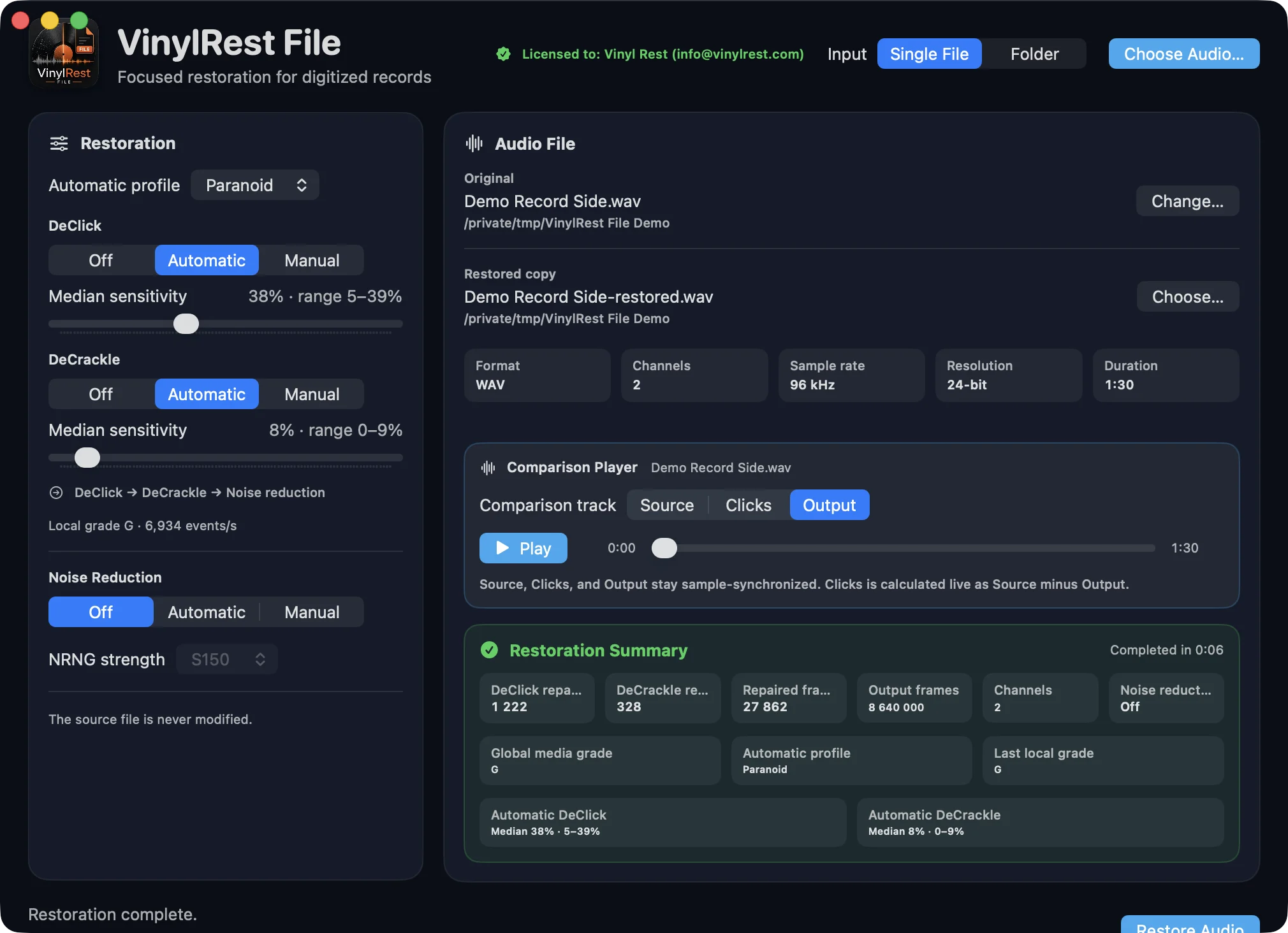
After a successful restoration, the Comparison Player keeps three views of the job at the same sample position:
- Source plays the untouched input file.
- Clicks is calculated live as Source minus Output. It isolates the signal removed by the restoration so you can check whether musical transients were affected.
- Output plays the validated restored file.
- Selecting another track does not move the playhead. The Play/Pause button and scrubber control all three tracks together.
- Playback and the completed comparison are cleared when the source, destination or restoration settings change.
Command-line invocation
The executable inside the application bundle can process one explicit source without opening a window or reading the saved graphical controls:
"/Applications/VinylRest File.app/Contents/MacOS/VinylRestFile2App" \
  -i "/path/to/input.wav" \
  -o "/path/to/output-folder"
-i is required. The output folder defaults to the source folder, the restored name defaults to <source>-restored.<extension>, and the reusable analysis defaults beside the input.
Command-line options
| Option | Meaning |
|---|---|
-i FILE | Required source file |
-o DIRECTORY | Existing output directory |
-a ANALYSIS_FILE | Reuse this compact analysis when it exists, or create it after a new analysis |
-d | Authorize safe replacement of the exact selected output set |
-dcl -1|0|1…100 | DeClick: Automatic, Off or Manual sensitivity |
-dcr -1|0|1…100 | DeCrackle: Automatic, Off or Manual sensitivity |
-nrng s150|s200 | Select Conservative S150 (default) or Primary S200; the global grade selects the 1–12 dB whole-file maximum |
-p NAME | Paranoid, Light, Mid, High or saved Custom profile |
-json | Backward-compatible no-op; compact reports are always published in CLI mode |
-h, --help | Print built-in terminal help |
Without explicit options, CLI restoration always uses NG2 with Paranoid, Automatic DeClick and DeCrackle, and NRNG Conservative S150 at the global-grade maximum. These deterministic defaults do not rewrite graphical restoration controls.
Reuse an analysis and its settings timeline
When the path selected by -a already contains a valid analysis, VinylRest skips global grading and the local Automatic preflight. The analysis becomes the immutable processing command. Its sparse settingsTimeline starts at zero and adds a row only when DeClick, DeCrackle or Noise Reduction changes.
00:00:00:000;20;3;5
00:01:48:000;35;7;10
Each row remains active until the next row. Explicit NRNG timeline values may range from 1 to 12 dB; each change uses a 15 ms correction-mix transition. Invalid or inconsistent analyses fail closed and are never silently replaced by a new analysis.
CLI output combinations
| Options | Published set |
|---|---|
| New analysis | Restored audio, compact analysis beside the input and compact repaired report beside the output |
| Reused analysis | Restored audio and compact repaired report; the analysis is read-only input |
Terminal completion and exit status
Progress is printed in one fixed-width line. A successful summary includes destination, elapsed time, grade, repair totals and every published path.
- 0
- Success or help.
- 1
- Input, output, processing or validation failure.
- 2
- Invalid command syntax or option value.
- 130
- Cancelled by SIGINT, normally Control-C.
- 143
- Cancelled by SIGTERM.