A useful starting point
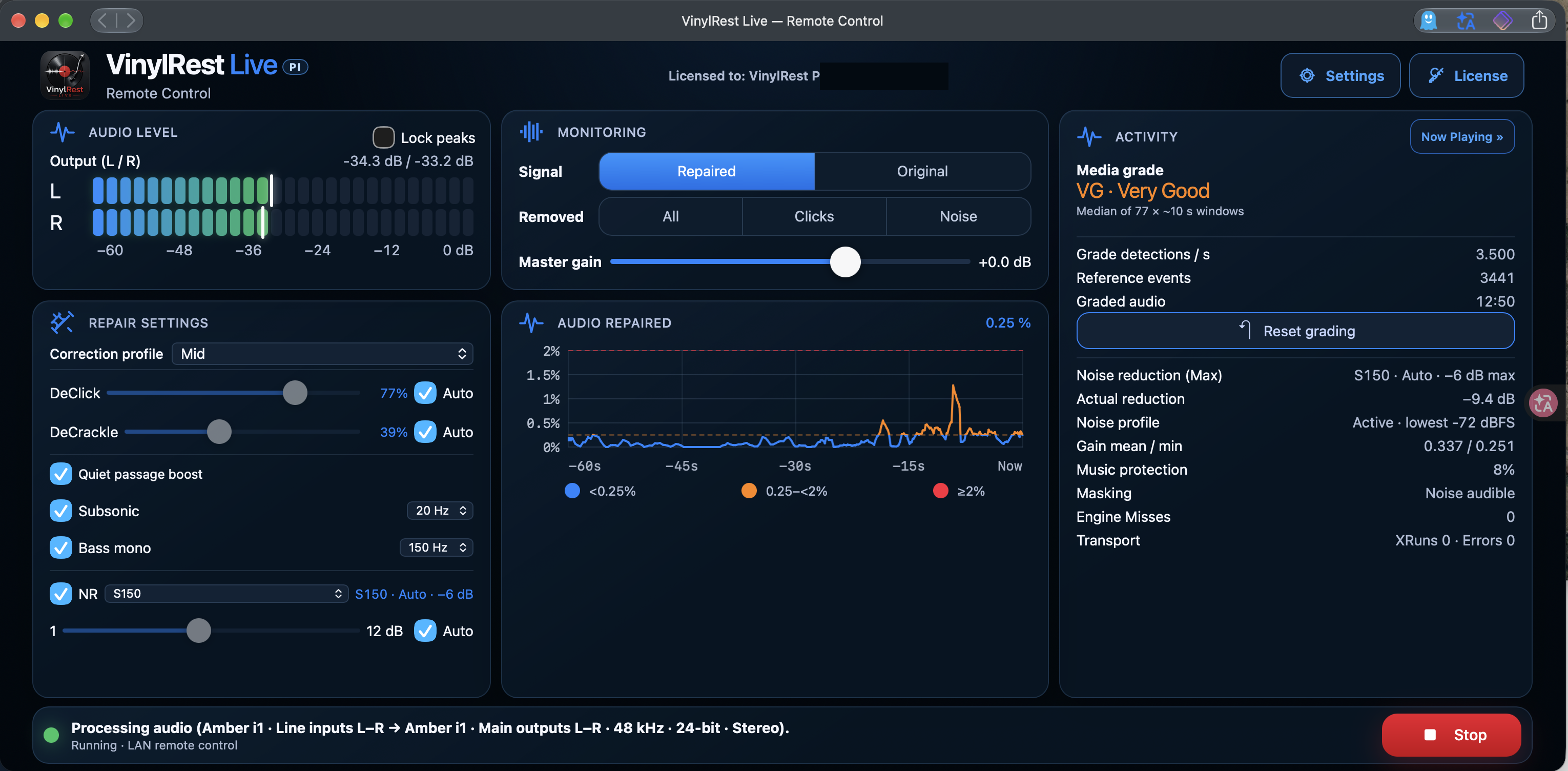
Start at 48 kHz / 24-bit with the Mid correction profile, DeClick and DeCrackle on Auto, and NR set to S150 with Auto. Listen to Repaired, then compare Original before making stronger adjustments.
Clicks and crackle
DeClick targets individual impulsive defects. DeCrackle handles finer, repeated crackling. Each has its own sensitivity and Auto control. With Auto enabled, its slider shows the current automatic value. Disable Auto to choose a manual amount; 0 bypasses that repair stage.
Quiet passage boost lets automatic DeClick and DeCrackle increase their correction during quiet music. It does not change the reference media grade or NR strength. The threshold and maximum increase are set in Settings.
Subsonic and Bass mono
Subsonic reduces very low-frequency energy such as turntable rumble. Bass mono combines low-frequency stereo information below its selected cutoff. The shown defaults are 20 Hz and 150 Hz. Both controls can be switched independently; evaluate them with your records and system.
Noise reduction
NR reduces continuous surface noise. S150 is the gentler starting choice; S200 offers a stronger character. Auto follows the selected profile's grade-dependent limit, while manual mode lets you choose the level yourself.
A matching generic noise profile can support processing while Live acquires a local profile from the record. For the local profile, it searches the beginning of a side, ignores the initial settling second, and selects one continuous second of eligible noise from the following three seconds. Lower the stylus into the lead-in so Live can hear surface noise before the music starts.
Activity shows the profile state, including generic or locally acquired operation. A profile that has not changed yet is not, by itself, an audio fault. Use NRNG maximum capture level cautiously: raising it can help with noisier grooves but can also admit quiet music. Input calibration helps separate system silence from groove noise.
Automatic correction profiles
The selected correction profile defines how much automatic repair is allowed at each grade, from M · Mint through P · Poor. Auto controls remain independent. Changing the audible restoration does not directly redefine the fixed reference measurement used for grading.
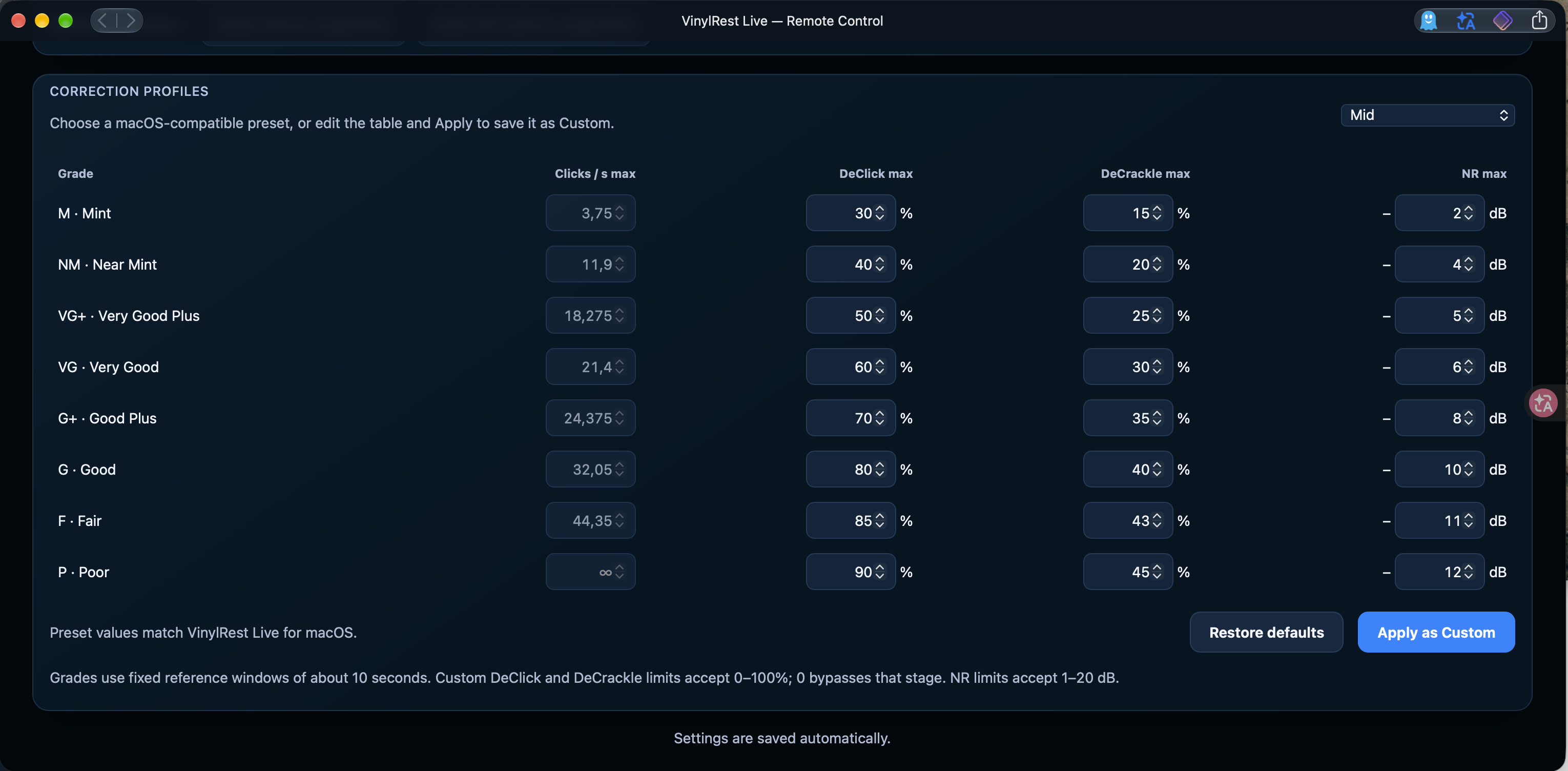
Choose a preset, or edit the table and select Apply as Custom. Custom DeClick and DeCrackle limits accept 0–100%; 0 bypasses that stage. NR limits accept 1–20 dB. Restore defaults restores the table defaults. The preset values match VinylRest Live for macOS.
Grades use reference windows of about ten seconds. Give the analysis enough music to settle, and use listening comparisons rather than aiming for a particular graph percentage.
Sample rate and the Pi's processing budget
| Pi / rate | DeClick behaviour |
|---|---|
| Pi 5 · 44.1 or 48 kHz | All four click families are enabled. |
| Pi 5 · 88.2 or 96 kHz | Ordinary clicks remain active; stereo plops, per-channel plops and short residual impulses are disabled. |
| Pi 4 Model B | The Configurator offers 48 kHz only, with all click families. |
DeCrackle, NR, grading, Subsonic and Bass mono remain available under the high-rate Pi 5 policy. This follows the actual negotiated audio rate. 48 kHz is the recommended default; a higher rate is not automatically a better restoration setting.